
White light · direct button operation
Button-Controlled White LED Modules: On/Off and Step Dimming Without a Remote
Many buyers only need white light—cool white, warm white or neutral white—and prefer to operate the lamp directly with a button rather than commission a remote control. The useful functions are often straightforward: on/off and a few brightness levels. The important questions are which levels the user needs and whether the button remains accessible after installation.
Can a rechargeable LED lighting project use button control?
Yes. Vcan can review a supported white-light module or OEM configuration for button operation, including on/off and step dimming. Agree the required actions and brightness levels before preparing the sample. Do not assume that every standard module has the same button functions.
One practical example is the approximate 100% / 65% / 35% / OFF requirement in Vcan's portable table-lamp development case. There are three illuminated brightness levels; OFF is a separate state. The customer development history belongs in that case, while this guide focuses on button operation.
The confirmed button operation is straightforward: short-press the button to switch brightness levels; long-press it to turn the light on or off. The brightness targets are approximately 100%, 65% and 35%. OFF is controlled by the long press, not presented as a fourth brightness level in the short-press dimming cycle. The exact starting level, cycling order and long-press duration should follow the approved product instructions.
Other buyers may prefer levels such as 30%, 60% and 100%. Those are examples of settings to discuss, not the levels used in the Denmark project or a standard specification for every module.
Start with the user's everyday operation
A buyer may prefer direct operation because the light does not need to be controlled from across the room. A local button can also avoid making a separate remote or app part of that particular user's routine. Whether it is convenient depends on the finished product, not just the module specification.
Ask how the lamp will be used. Is it lifted before switching on? Does the user need to adjust brightness while it stays on a table? Will several products need remote operation? A button-only approach should be selected for the intended interaction rather than treated as a universal improvement.
For a white-only project, select the required white-light colour and brightness control separately. Cool, warm and neutral white describe light colour; the dimming steps describe brightness. A three-step dimming request does not, by itself, mean that the module switches between three colour temperatures. For light-colour selection, see the separate white versus RGBW LED module guide.
If the actual requirement is to retain an existing remote across old and new products, see the separate existing-remote code-matching guide. That is a different problem from removing the need for a remote.
Check access after the module is installed
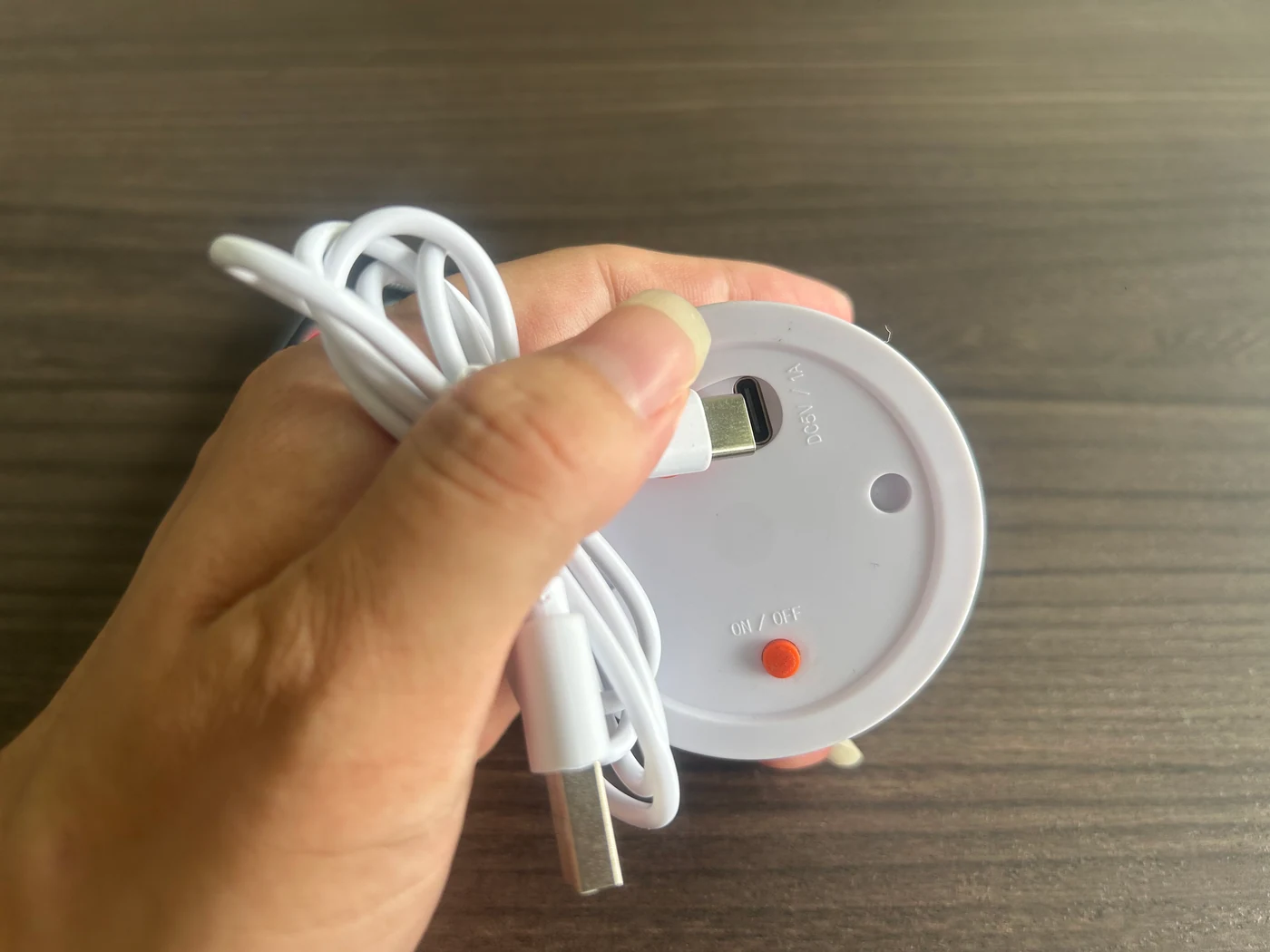
The supplied product photograph shows a physical button on the underside of the module, beside the charging connection. This makes the housing's access arrangement important: the button must remain reachable in the way the finished product is intended to be used.
A button that is accessible on a loose module may be hidden once it is fitted inside a lamp or piece of illuminated furniture. Review the intended housing and installation position with the sample.
For a lamp switched on before placement, access underneath may suit the intended routine. For a light that needs adjustment while standing in place, the buyer may need an accessible opening or a different control arrangement. These are design choices to review, not instructions to drill or modify an existing finished product.
Test the actual assembly. Check whether the user can reach and operate the button without removing the module, pulling on cables or disturbing the product's normal position. Also consider whether the button is likely to be pressed unintentionally when the product is moved or placed down.
Define the button actions instead of requesting “simple control”
| Requirement | What to agree for the sample |
|---|---|
| On/off | Long press in the confirmed configuration; agree the operation for your selected sample |
| Step dimming, if needed | Short press in the confirmed configuration; agree the brightness levels for your selected sample |
| Other functions | Which functions are needed and which should be omitted |
| Physical access | The button position relative to the finished housing |
| Instructions | A clear description of the approved button actions |
For the described configuration, short presses select the brightness levels and a long press switches the light on or off. For a new project, agree both the target levels and the intended button actions. If a project only needs on/off, say so before sample preparation rather than assuming unwanted functions can be removed later.
A physical button does not automatically mean button-only control
Some modules combine a local button with another control method. When requesting a white-only configuration, make clear whether you want operation without a handheld remote or app, rather than simply asking for a module that also has a button.
For a new project, specify whether the button is the primary control, a backup, or the only control you want. Vcan can then review a suitable supported configuration. For a broader comparison of technologies, use the LED module control-options guide.
Approve operation in the finished housing
Before production, test the intended button actions with the sample installed in a representative housing. Confirm the lighting requirements separately: a convenient button does not establish brightness, runtime or mechanical compatibility.
Record the agreed actions and access arrangement with the approved sample. Keep user instructions consistent with that configuration, particularly if related products use different controls.
Developing a lamp without a remote or app?
Send Vcan a product photo or sketch, the proposed module position and the actions you want the button to perform. Identify whether direct button operation is your only control requirement or whether another control method must remain available.
Frequently asked questions
Can I omit the handheld remote from my project?
State that requirement when requesting a sample. The selected module's supported control configuration must be confirmed; omitting a remote from the package does not, by itself, establish suitable button operation.
Does every physical button support dimming?
Do not assume so. Confirm the actual button functions for the selected module and test the agreed operation.
How does the button operate in the configuration described here?
A short press switches brightness levels. A long press turns the light on or off. Confirm the cycling order, starting behaviour and press duration in the approved product instructions; those details are not specified here.
Can I request three brightness levels instead of continuous dimming?
Yes, step dimming can be reviewed for a supported configuration. Specify your approximate target levels. The Denmark project used approximately 100%, 65% and 35%, plus OFF; other projects should confirm their own supported settings.
Does three-step dimming mean warm, neutral and cool white?
No. Brightness steps and white-light colour are separate requirements. Specify the desired white-light colour as well as the dimming levels.
Can the button still be used after installation?
That depends on its position and the finished housing. Evaluate access with the module installed, not only while holding a loose sample.
Will button-only control always cost less?
Do not assume a saving. The quotation depends on the agreed module and control configuration. Any price difference needs a project-specific quotation.